
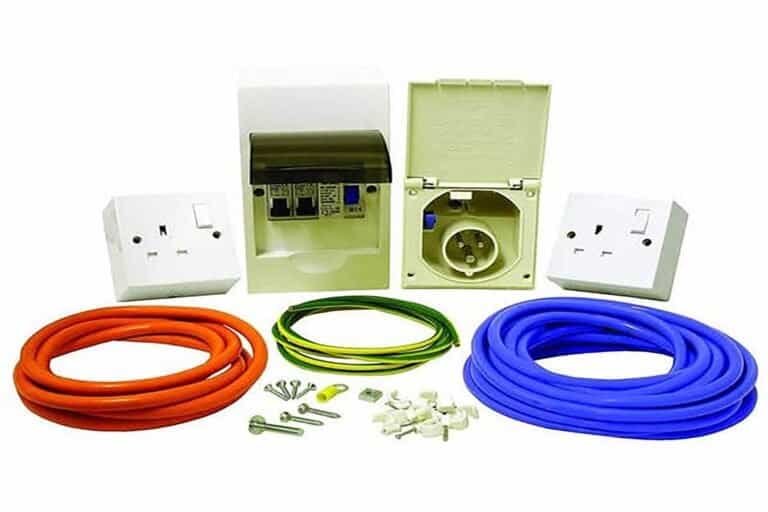
This isn’t like wiring 12V systems where mistakes just mean things don’t work. With 230V mains electricity, mistakes can kill you. The regulations exist because people have died. I’m going to walk you through exactly what’s required, why it’s required, and how to install it properly without killing yourself or failing a habitation inspection.
Why You Need a Consumer Unit (And Not Just a Fuse)
Understanding the importance of a Campervan Consumer Unit is crucial for the safety and functionality of your electrical system.
A consumer unit is essentially a fuse box for your 230V system. But calling it “just a fuse box” is like calling an airbag “just a cushion.” The critical component is the RCD.
To ensure safety, every electrician working on 230V installations should be aware of the correct installation of a Campervan Consumer Unit.
An RCD monitors the current flowing out through the live wire and back through the neutral wire. These should be equal. If they’re not equal, it means current is leaking somewhere—probably to earth through a fault, or through you if you’ve touched something live.
A properly installed Campervan Consumer Unit can save lives by preventing electrocution.
When the RCD detects as little as 30mA difference between live and neutral current, it trips in 40 milliseconds and cuts all power. Forty milliseconds is fast enough to prevent a fatal shock in most cases.
A fuse doesn’t protect you from electrocution. A fuse protects cables from overheating. If you touch a live wire and current flows through you to earth, that current might be 50-100mA—not nearly enough to blow a fuse (which typically requires thousands of milliamps), but more than enough to stop your heart.
This is why every habitation vehicle with 230V capability must have RCD protection. It’s required by BS 7671:2018+A2:2022 (the UK Wiring Regulations) and BS EN 1648-2:2018 (specific regulations for leisure accommodation vehicles).
What The Regulations Actually Say
The relevant regulations for campervan electrical systems are dense and written in the sort of language that makes your eyes glaze over. Let me translate the important bits.
BS 7671:2018+A2:2022 (18th Edition Wiring Regulations):
This covers all electrical installations in the UK, including caravans and motorhomes. The sections relevant to campervans are:
- Regulation 411.3.3: RCD protection with 30mA sensitivity required for all socket outlets rated up to 32A
- Regulation 531.2.4: RCDs must disconnect both live and neutral conductors
- Regulation 701.55: Additional requirements for caravans and motor caravans
- Regulation 411.3.2.2: Maximum disconnection time of 40 milliseconds for 230V systems
BS EN 1648-2:2018 (Leisure accommodation vehicles – 12V and 230V installations):
This is specific to caravans and motorhomes:
- Section 8.3.1: Every 230V installation must have RCD protection
- Section 14.4: Shore power inlet must connect directly to the consumer unit with no intermediate connections
- Section 14.5: Cable from shore inlet to consumer unit must be as short as possible and protected from mechanical damage
- Section 8.4: Consumer unit must be readily accessible but protected from weather and mechanical damage
I’m not a legal or an electrician. I’m a facilities maintenance worker with 30 years of experience who’s learned to read regulations because I needed to understand what was required for my own builds. If you want definitive legal advice, consult a qualified electrician or the IET (Institution of Engineering and Technology) who publish the BS 7671 regulations.
But here’s what those regulations mean in practice for your campervan:
- You must have an RCD. Not optional. Not negotiable.
- The RCD must be 30mA sensitivity, trip in 40 milliseconds or less.
- It must protect all 230V circuits and sockets in your van.
- The shore power cable must go straight to the consumer unit before branching to anything else.
- The consumer unit must be accessible (not buried behind furniture you can’t easily remove).
Choosing a Consumer Unit: What Actually Matters
Consumer units come in various sizes and configurations. For campervans, you’re looking at small residential-style units, not industrial switchgear.
The key specifications:
Number of ways: This is how many individual circuits (MCBs – Miniature Circuit Breakers) the unit can accommodate. Most campervan installations need 2-4 ways:
- One circuit for the ring main (sockets around the van)
- One circuit for lighting (if you’re running 230V lights, which I don’t recommend)
- One circuit for a dedicated battery charger socket
- Possibly one spare for future expansion
RCD rating: The RCD needs to handle the maximum current your shore power connection can supply. Most UK and European campsites provide 10A or 16A supply. Your RCD should be rated for at least 16A, typically 40A or 63A (which is the standard size for domestic consumer units).
RCD sensitivity: Must be 30mA. This is non-negotiable. You’ll see 100mA and 300mA RCDs for industrial applications—these are not suitable for caravans and don’t meet the regulations.
Choosing the right Campervan Consumer Unit is key to a safe and effective electrical system.
MCB ratings: The individual circuit breakers should be sized for your circuits:
- 16A MCB for a ring main serving 13A sockets
- 6A MCB for a battery charger circuit
- 6A MCB for lighting (if applicable)
Every campervan must have a reliable Campervan Consumer Unit to guarantee electrical safety.
Installing a Campervan Consumer Unit is crucial for connecting your electrical appliances safely.
Physical size: Consumer units are measured in “modules” – the width of a standard MCB. A 2-way unit is typically 4-6 modules wide (about 70-110mm). This needs to fit on your van wall somewhere accessible.
Make sure the Campervan Consumer Unit is installed following all safety regulations.
What I actually use:
Van three had a Wylex 2-way consumer unit (£48 from Screwfix) with a 63A 30mA RCD and two MCBs (16A and 6A). This is a budget unit but it’s made by a reputable manufacturer and meets all the regulations.
My Ducato uses a BG CUCRB206 2-way unit (£52 from B&Q in Colchester) with similar specifications. I chose this one because it’s slightly more compact (fits better in my available wall space) and has a hinged cover that’s easier to access than the Wylex pull-off cover.
Both units are perfectly adequate. The difference between a £50 consumer unit and a £150 “premium” unit is mostly cosmetic finish and ease of installation features. The actual protection they provide is identical if both meet BS 7671.
What to avoid:
Cheap no-name consumer units from eBay or Amazon marketplace sellers. I’ve seen units advertised at £25-30 that claim to meet UK regulations but have no certification markings. These are often imported units designed for different markets with different safety standards.
Buy from a reputable supplier (Screwfix, Toolstation, B&Q, electrical wholesalers) and check for:
- CE marking
- BS EN 61439 certification (for the consumer unit enclosure)
- BS EN 61008 certification (for the RCD)
- BEAB (British Electrotechnical Approvals Board) mark if possible
Where to Mount the Consumer Unit
The regulations say the consumer unit must be “readily accessible” but “protected from mechanical damage and weather.” In practice:
Good locations:
- On the wall behind the driver’s or passenger’s seat (high enough to be out of the way, low enough to reach easily)
- On a wall inside a cupboard (as long as the cupboard door opens wide and you don’t have to remove stuff to access it)
- Near the shore power inlet but inside the van
Bad locations:
- Under the bed where you have to lift the mattress and base every time you need to reset a breaker
- Behind the driver’s seat where it’s exposed to weather when the door is open
- In the garage/storage area where it could be damaged by cargo shifting
Height considerations:
The regulations don’t specify an exact height, but standard practice from domestic installations suggests:
- Bottom of the unit: 1.2m minimum from floor (prevents children reaching it easily)
- Top of the unit: 2.0m maximum from floor (prevents needing a stepladder to access it)
My Ducato consumer unit is mounted on the wall behind the passenger seat at 1.5m from floor (measuring to the bottom of the unit). This puts it at roughly shoulder height when I’m standing, easy to reach, easy to see, and protected from door weather by the seat structure.
The wall mounting must be solid. Consumer units aren’t heavy (maybe 1-2kg loaded with MCBs) but they need to be securely fixed because you’ll be operating switches and removing/installing MCBs which creates lateral force.
I mount to the van’s metal ribs using M4 self-tapping screws (four screws minimum, one in each corner of the mounting plate). If you’re mounting to plywood or MDF wall cladding, make sure the screws go through into the metal ribs behind—the cladding alone isn’t strong enough.
The Shore Power Inlet: Your Connection to the Grid
Before you can wire the consumer unit, you need to know where your shore power inlet is and what cable you’re running from it.
Shore power inlet types:
Standard caravan/motorhome inlets are designed to accept a 16A shore power cable with a blue CEE plug (IEC 60309-2 specification). These inlets have:
- Three pins: live, neutral, earth
- Blue housing (industry standard for 230V shore power)
- Weatherproof cover/flap
- Mounting flange for installation in van wall
I use a standard inlet from Just Kampers (£28) or similar from CEF (City Electrical Factors, trade electrical supplier). The Victron shore power inlet (£32) is slightly better quality with a more robust cover mechanism but functionally identical.
Investing in a quality Campervan Consumer Unit can enhance the safety of your electrical system.
Where to mount the inlet:
Most UK campsites have electrical hook-up posts on the passenger side (offside) of pitches. Mount your inlet on the passenger side of the van, roughly at the same height as typical hook-up posts (400-600mm from ground).
Height matters less than you’d think—too low and you’re crawling in mud to plug in, too high and you’re reaching up awkwardly. I mount mine at 500mm from ground, which is comfortable for standing/crouching to connect the cable.
Cutting the inlet hole:
The inlet comes with a paper template showing the cutout size required. Tape this to the van wall where you want the inlet. Check inside the van that you’re not about to cut through any hidden structure (ribs, wiring, plumbing).
I use a 60mm hole saw for the initial pilot hole, then a jigsaw with a metal-cutting blade to cut the shaped opening. Cut 1mm inside the template line, test-fit the inlet, then file or sand to final size. Better to go slightly undersize and enlarge carefully than cut oversize and have gaps.
The inlet mounting flange should sit flush against the van wall. Most vans have slightly curved walls, so you might need to file or sand the mounting holes slightly to allow the screws to pull the flange tight without distorting it.
Seal the flange with clear silicone (not black mastic, which looks awful). Run a thin bead around the flange perimeter, press the inlet into position, install the mounting screws, then clean up excess silicone with a wet finger before it sets.
The Cable Run: Shore Inlet to Consumer Unit
This is where many DIY installations fail. The regulations are very specific about this cable run:
It must be continuous with no joins.
You cannot have junction boxes, terminal blocks, or spliced connections between the shore inlet and the consumer unit. If your cable isn’t long enough, buy a longer piece. Don’t join two shorter pieces.
Why? Because every connection is a potential failure point, especially in a vibrating vehicle. A loose connection in a 230V circuit can arc, overheat, and start a fire. The continuous cable rule eliminates this risk.
Cable specification:
Use 2.5mm² 3-core Arctic flex cable. Arctic flex is designed for outdoor use, low-temperature flexibility, and mechanical stress. The blue outer sheath makes it clearly distinguishable from 12V wiring.
The cores are:
- Brown = Live
- Blue = Neutral
- Green/yellow = Earth
2.5mm² is the standard size for a 16A supply. It’s rated for 27A in free air, which gives adequate safety margin for the 16A maximum your shore connection will provide.
Don’t use household twin-and-earth cable. It’s not flexible enough for vehicle use and the insulation isn’t rated for the temperature range you’ll encounter in a van (-20°C winter nights to +40°C summer sun on metal panels).
A well-installed Campervan Consumer Unit is essential for safe connections to your electrical system.
Cable length:
Measure the actual route from your shore inlet to where the consumer unit will mount. Add 500mm for connections and tidying. That’s your cable length.
My Ducato cable is 2.5 metres. Shore inlet on passenger side at rear, consumer unit on passenger side wall behind front seat. The cable routes along the van’s internal ribs, secured with plastic cable clips every 400mm.
Cable protection:
The cable must be protected from mechanical damage. This means:
- Don’t run it where furniture can shift and crush it
- Don’t run it where feet will tread on it
- Protect it where it passes through metal holes (use rubber grommets)
- Secure it so it can’t chafe against metal edges
I run the cable inside plastic trunking where it’s visible (along the wall from inlet to consumer unit). This looks tidy and provides mechanical protection. You can use D-Line trunking from B&Q (about £8 for 2 metres) or similar.
Where the cable exits the shore inlet (inside the van), there’s usually a cable gland or strain relief bush provided with the inlet. Use this. It prevents the cable being pulled or twisted and stressing the terminal connections inside the inlet.
Wiring the Shore Inlet
The shore inlet has three terminals inside (accessible after removing the cover plate):
- L (Live): Connect brown wire
- N (Neutral): Connect blue wire
- ⏚ (Earth): Connect green/yellow wire
Strip about 10mm of insulation from each wire. The terminals are typically screw-type with a brass bar that clamps down on the wire. Insert the wire fully into the terminal, tighten the screw firmly (but don’t strip the thread), then tug the wire to make sure it won’t pull out.
Common mistake: Leaving too much exposed copper outside the terminal. You want about 1-2mm of exposed copper visible, no more. If you can see 5-10mm of bare copper, you’ve stripped too much insulation. Cut the wire back and re-strip.
Regular maintenance of your Campervan Consumer Unit is necessary for safety.
After making the connections, give each wire a firm tug (pull with about 5-10kg of force). The wire should not pull out. If it does, the connection isn’t tight enough.
Replace the inlet cover and test the mechanical fit. The cover should close completely without pinching the cable. If the cable is forcing the cover open slightly, you need to route it differently or use a larger cable gland.
Wiring the Consumer Unit
Right. This is the critical part. Get this wrong and you can create a hazard that doesn’t show up until months later when something fails under load.
Consumer unit internal layout:
Open the consumer unit cover. Inside you’ll see:
- Main terminals at the top or side (where shore power connects)
- RCD with a test button
- MCB positions (typically empty, you install MCBs as needed)
- Bus bars (brass bars that distribute power from the RCD to the MCBs)
- Earth bar (brass bar with multiple screw terminals for earth connections)
Installing the shore power cable:
The cable from your shore inlet connects to the main terminals. These are labeled:
- L IN or just L: Live input (brown wire)
- N IN or just N: Neutral input (blue wire)
- The earth bar: Earth (green/yellow wire)
Strip 10-12mm from each wire. Insert into the appropriate terminal, tighten screw firmly, tug-test each connection.
The earth connection is particularly important. Make sure the wire is fully inserted into the earth bar terminal and the screw is tight. A poor earth connection compromises the entire safety system.
Installing the MCBs:
MCBs (Miniature Circuit Breakers) clip onto the DIN rail inside the consumer unit and connect to the bus bars automatically when you push them into place.
For my typical 2-way campervan setup:
- MCB 1: 16A Type B MCB for the ring main
- MCB 2: 6A Type B MCB for the battery charger circuit
“Type B” refers to the trip characteristic. Type B MCBs trip at 3-5× their rated current, which is correct for general use circuits. You might see Type C MCBs (trip at 5-10× rated current) which are for motor loads, but Type B is what you want for campervans.
Push each MCB onto the DIN rail until it clicks into place. The MCB should be firmly seated with no wobble. The live bus bar should be making contact with the MCB input terminal (you can’t see this, but if the MCB is seated properly, it’s connected).
Wiring the outgoing circuits:
Each MCB has an output terminal (usually on the bottom of the MCB, labeled “OUT” or with an arrow pointing down). This is where you connect the cable that goes to your sockets/loads.
For the ring main:
- Connect brown (live) wire to the 16A MCB output terminal
- Connect blue (neutral) wire to the neutral bar (separate brass bar, usually on the opposite side from the live bus bar)
- Connect green/yellow (earth) wire to the earth bar
For the battery charger circuit:
- Connect brown wire to the 6A MCB output terminal
- Connect blue wire to the neutral bar
- Connect green/yellow wire to the earth bar
Ring main wiring:
A ring main is standard UK domestic practice. The cable starts at the consumer unit, runs to the first socket, then to the second socket, then back to the consumer unit. This creates a ring where power can flow in either direction to reach each socket.
For campervan use, I typically install just two 13A sockets:
- One in the kitchen area (for kettle, toaster, or other kitchen appliances when on shore power)
- One in the living area (for charging laptops, running a fan, etc.)
The cable route: Consumer unit → Kitchen socket → Living area socket → Back to consumer unit.
At the consumer unit, you’ll have four wires:
- Two brown (live): one outgoing to first socket, one returning from last socket
- Two blue (neutral): one outgoing, one returning
- Two green/yellow (earth): one outgoing, one returning
Both live wires go into the MCB output terminal together. Both neutral wires go into a single terminal on the neutral bar. Both earth wires go into a single terminal on the earth bar.
This might seem odd (two wires in one terminal) but it’s standard practice for ring mains and the terminals are designed to accept it. Make sure both wires are fully inserted and the terminal screw is very tight.
Testing before closing up:
Before you close the consumer unit and test with actual power, do a visual inspection:
- All terminals tight? (Give each wire a tug)
- No exposed copper visible outside terminals? (Except for the last 1-2mm)
- All MCBs firmly seated on the DIN rail?
- No stray strands of copper that could cause a short?
- Cable entries through the consumer unit are via proper knockouts or cable glands? (Not just holes in the plastic)
If everything looks good, close the consumer unit cover.
Installing the Ring Main Sockets
Standard UK 13A sockets need proper mounting. You can’t just screw them to the van wall—they need a back box for mechanical support and to contain the connections.
Back box options:
Metal back boxes are standard for domestic installations. They’re robust and provide excellent earth continuity. But they’re rigid and don’t conform to curved van walls.
Plastic back boxes are easier to install in vans because they’re slightly flexible and can be shimmed to sit flat against curved surfaces. Make sure you use deep boxes (35mm minimum) to accommodate the cable and connections.
I use plastic back boxes (about £1.50 each from Screwfix). They mount to the van wall with screws into the metal ribs behind any wall cladding.
Your Campervan Consumer Unit should always be accessible for maintenance and inspections.
Socket installation process:
- Position the back box where you want the socket. Mark the mounting screw positions.
- Drill 3mm pilot holes, then install self-tapping screws through the back box into the metal ribs. The back box should sit reasonably flat against the wall. If the van wall is very curved, you might need to pack behind the box with washers or thin plastic shims.
- Feed the cable through the cable entry in the back box (knock out the appropriate entry hole with a screwdriver twist). Secure the cable with a rubber grommet or cable grip.
- Strip 10mm from each wire. Connect:
- Brown to L terminal on the socket
- Blue to N terminal
- Green/yellow to E (earth) terminal
- If this is a middle socket in the ring (not the first or last), you’ll have two cables: one incoming, one outgoing. Each terminal gets two wires (one from each cable). Make sure both wires are fully inserted and the terminal screw is very tight.
- Carefully fold the wires back into the back box. Screw the socket front plate to the back box.
- Test that the socket is mechanically secure (doesn’t wobble when you push a plug in).
Common socket wiring mistakes:
Mixing up live and neutral. Brown always goes to L (live), blue always goes to N (neutral). If you reverse these, appliances might still work but you’ve created a shock hazard.
Poor earth connections. The earth wire is your safety system. Make sure it’s properly stripped, fully inserted in the terminal, and tightly screwed.
Too much exposed copper. If you can see more than 2mm of bare copper outside the terminal, you’ve stripped too much insulation. This creates risk of shorts.
Over-stuffing the back box. With two cables entering a socket (four wires per terminal = 12 wires total), the back box gets crowded. Fold the wires carefully so they don’t prevent the socket front plate from sitting flush. If you can’t get the front plate screws to tighten properly, the wires are preventing it from seating—remove the socket and re-fold the wires more compactly.
The Battery Charger Circuit
This is a simple radial circuit (not a ring) that feeds a single socket used exclusively for your battery charger.
Why a separate circuit? Two reasons:
- Protection: If the battery charger develops a fault, it only trips its own 6A MCB, not the entire ring main. Your other 230V appliances keep working.
- Cable sizing: A dedicated charger socket only needs 1.5mm² cable (the charger draws 3-4A maximum) whereas the ring main uses 2.5mm² cable. This saves a small amount of money and space.
The wiring is simpler than the ring main:
Consumer unit (6A MCB) → 1.5mm² cable → Single 13A socket (near the battery)
At the consumer unit:
- Brown to 6A MCB output terminal
- Blue to neutral bar
- Green/yellow to earth bar
At the socket:
- Brown to L terminal
- Blue to N terminal
- Green/yellow to E terminal
Every campervan owner should know the benefits of a properly functioning Campervan Consumer Unit.
This socket should be labeled (I use a Brother label maker: “BATTERY CHARGER ONLY”). This prevents you accidentally plugging a kettle into it and overloading the 6A MCB.
When you’re on shore power, you plug your battery charger (Victron Blue Smart, CTEK, or whatever you’re using) into this socket. The charger draws 230V mains power and outputs 12V charging current to your leisure battery. When you disconnect from shore power, you unplug the charger and stow it away.
Testing and Commissioning: Do This Before You Plug Anything In
You’ve wired everything. Now you need to test it before connecting to actual shore power. Testing in the wrong order can damage equipment or injure you.
Step 1: Visual inspection (again)
Walk through every connection one more time:
- All terminals tight?
- All MCBs seated properly?
- No exposed copper?
- All earth connections made?
- RCD test button moves freely?
Step 2: Continuity testing (dead testing)
With no power connected, use a multimeter to check:
Live to neutral continuity: Set multimeter to continuity mode. Touch probes to live and neutral pins of a socket (with the MCB switched on at the consumer unit). Should read continuity (beep) if the circuit is complete. This confirms the circuit is wired through properly.
Earth continuity: Touch one probe to the earth pin of a socket, other probe to bare metal chassis. Should read very low resistance (less than 1Ω). This confirms earth is properly connected to chassis.
Insulation resistance: This is harder to test without proper equipment (insulation testers cost £200-300). But you can do a basic check: with everything switched off, test resistance between live and earth, and between neutral and earth. Should read very high resistance (megaohms). If you read low resistance (less than 1kΩ), you have a short somewhere.
Step 3: RCD testing (still no power)
Press the RCD test button. The RCD should trip immediately (you’ll hear a loud click and the switch will move to the off position). If it doesn’t trip, the RCD is faulty and must be replaced before you go any further.
Reset the RCD (push the switch back to on position). It should stay on. If it immediately trips again without pressing the test button, there’s a fault in your wiring.
Step 4: First power-on (the nervous moment)
Now you’re ready to connect to actual shore power. This is where you find out if you’ve made any serious mistakes.
Before plugging in:
- Make sure the RCD is off (switched to off position)
- Make sure all MCBs are off
- Make sure no appliances are plugged into any sockets
Plug your shore power cable into a campsite hook-up or a domestic socket (via an adapter). Nothing should happen because everything is switched off.
Turn on the RCD. It should stay on. If it immediately trips, you have an earth leakage fault somewhere. Disconnect from power and investigate.
With the RCD on, turn on one MCB (start with the battery charger circuit, which has the least load). The MCB should stay on. If it trips, there’s a fault in that circuit.
Turn on the ring main MCB. Again, it should stay on.
Step 5: Load testing
Plug a low-power appliance (phone charger, about 10W) into one of your ring main sockets. It should work normally. Try each socket in turn.
Plug your battery charger into the dedicated charger socket. It should power on and start charging.
Try progressively higher-power appliances: laptop (65W), kettle (2000W), etc. Everything should work normally and the MCBs should not trip unless you exceed 16A total load (3,680W).
Step 6: RCD trip testing under load
This is the critical safety test. With an appliance running (something obvious like a lamp), press the RCD test button. The RCD should trip immediately, cutting power to the lamp.
This confirms the RCD is actually working and will protect you if there’s a real fault.
Common Problems and How to Fix Them
Across three builds with shore power, I’ve encountered most of the common installation problems. Here’s what goes wrong and how to sort it:
RCD trips immediately when turned on (with no load connected):
This indicates an earth leakage fault. Somewhere in your wiring, live or neutral is making contact with earth.
Diagnosis process:
- Turn off RCD and both MCBs
- Turn on RCD only (should stay on)
- Turn on battery charger MCB only. Does RCD trip? If yes, fault is in the battery charger circuit. If no, fault is in ring main.
- If fault is in ring main: Disconnect the cable at the first socket. Turn on MCB. Does RCD trip? If no, fault is in the cable from consumer unit to first socket. If yes, fault is further along the ring.
- Keep isolating sections until you find which section contains the fault.
Common causes:
- Screw through a cable (I did this, remember)
- Water ingress into a socket back box
- Damaged cable insulation
- Stray strand of copper touching earth in a socket or consumer unit
MCB trips when you plug in an appliance:
If the MCB trips instantly (before the appliance even turns on), there’s a short circuit in the appliance or the socket. Try a different appliance. If the MCB still trips, the fault is in the socket wiring.
If the MCB trips after the appliance has been running for a while, you’re overloading the circuit. The MCB is doing its job. Use a lower-power appliance or spread your loads across multiple circuits.
RCD trips randomly:
This is frustrating because intermittent faults are hard to diagnose. Common causes:
- Moisture in connections: Water conducts electricity and creates leakage paths. Check all sockets and connections for moisture. I had this in Build #3—water was getting into a socket back box through a poorly sealed cable entry. Dried it out, resealed with silicone, problem solved.
- Damaged cable insulation: Vibration over thousands of miles can chafe insulation. Inspect the cable runs, particularly where cables pass through holes or contact metal edges.
- Appliance fault: Sometimes it’s not your wiring at all—it’s the appliance you’re plugging in. Try eliminating appliances one by one to see if the random tripping stops.
No power at sockets even though MCBs are on:
Check the obvious first:
- Is shore power cable actually plugged in at both ends?
- Is the campsite breaker switched on?
- Is the RCD on?
- Are the MCBs on?
If all those are yes, check voltage at the consumer unit with a multimeter. Should see 230V between live and neutral at the main terminals. If you don’t, the problem is upstream (shore cable or campsite supply).
If you have voltage at the consumer unit but not at the sockets, trace through the circuit:
- Check voltage at the MCB output terminals (should be 230V with MCB on)
- Check voltage at the first socket (should be 230V)
- If you have voltage at the consumer unit but not at the socket, the cable is broken somewhere
Van three war story:
I had a mysterious problem where one socket would work intermittently. Sometimes it would power appliances normally, sometimes nothing. RCD and MCBs never tripped.
Took me three weekends to diagnose. Eventually found that the neutral terminal in that socket had loosened due to vibration. The screw was still in place but the wire wasn’t clamped tightly. When the van was parked on level ground, gravity held the wire in contact with the terminal and everything worked. When parked nose-down, the wire would pull slightly away from the terminal and lose contact.
Fixed by tightening the terminal screw properly (and adding a dab of threadlock to prevent it loosening again).
Lesson: Connections can work perfectly during installation but fail under vibration or movement. Test everything, then test it again after you’ve driven 100 miles.
What About Gas Certification?
Here’s a question I get asked constantly: “Do I need certification for the 230V electrical installation the same way I need Gas Safe certification for LPG?”
Short answer: No legal requirement for certification, but highly recommended.
Long answer: Unlike gas installations (where it’s illegal to work on LPG systems without Gas Safe registration), electrical installations in campervans can be done by anyone. You don’t need to be a qualified electrician. You’re allowed to wire your own van.
However:
Insurance implications: Many van insurance policies require that 230V installations be “installed to professional standards” or “installed by a competent person.” If you have a fire caused by faulty wiring and the insurance investigator finds your installation doesn’t meet BS 7671, they might refuse to pay out.
Habitation inspections: If you’re having a habitation inspection done (some converters do this, some insurance companies require it), the inspector will check the electrical installation. If it doesn’t meet regulations, you’ll fail the inspection.
Resale value: When you sell the van, buyers will ask if the electrical installation is certified. If you can’t provide certification, they’ll either walk away or negotiate the price down to cover the cost of having it inspected and potentially rewired.
Your safety: This is the big one. Mistakes in 230V wiring can kill you. If you’re not confident in your ability to wire the installation safely, pay a qualified electrician to do it or at least inspect your work.
I’ve done all my own 230V installations but I have them inspected before use. My local auto-electrician (who does campervan conversions professionally) charges £85 to inspect and test a shore power installation. He provides a signed inspection certificate confirming the installation meets BS 7671.
This gives me confidence the installation is safe, provides documentation for insurance, and adds resale value. £85 well spent.
If you want to find someone to inspect your installation, look for:
- Auto-electricians who specialize in campervans/motorhomes
- Caravan dealers who offer habitation inspections
- Electricians who are registered with a competent person scheme (NICEIC, NAPIT, ELECSA, etc.)
Don’t just use any electrician. Find someone who knows the specific regulations for caravans and motorhomes (BS EN 1648-2) because there are differences from domestic installations.
The Complete Parts List
Here’s exactly what you need to buy for a typical 2-way consumer unit installation in a campervan:
Main components:
- Consumer unit 2-way with 63A 30mA RCD: £48-55 (Wylex from Screwfix, BG from B&Q, or similar from electrical wholesaler)
- 16A Type B MCB: £8-12 (for ring main circuit)
- 6A Type B MCB: £8-12 (for battery charger circuit)
- Shore power inlet: £25-35 (Just Kampers, Victron, or similar)
- 2.5mm² Arctic flex cable: £1.80-2.20 per metre (buy 5m minimum for consumer unit location flexibility)
- 1.5mm² Arctic flex cable: £1.20-1.60 per metre (buy 3m for charger circuit)
- 13A sockets (MK or BG brand): £3-6 each (buy 3: two for ring main, one for charger)
- Back boxes 35mm deep: £1.50-2.50 each (buy 3)
Fixings and accessories:
- Cable trunking: £8 for 2m (D-Line from B&Q or similar)
- Cable clips: £5 for 100 (small plastic clips from Screwfix)
- Rubber grommets: £4 for assorted pack (for protecting cable through metal holes)
- Clear silicone sealant: £4 (for sealing shore power inlet flange)
- Self-tapping screws M4 and M5: £3-5 for assorted pack (for mounting consumer unit and back boxes)
- Cable ties: £6 for 500 (Toolstation)
Total cost: £150-200 depending on cable lengths and where you shop.
This assumes you already have basic tools (screwdrivers, wire strippers, drill). If you need to buy a multimeter for testing, add £15-40.
Alternative Approach: Skip Shore Power Entirely?
Before I finish, let’s address the question: Do you actually need shore power?
Van 1 had no shore power. I relied entirely on solar and driving to charge the battery. For weekend trips in summer, this worked fine. In winter or for longer trips, it was limiting.
Van 2 added shore power and it transformed how I used the van. Being able to plug in at campsites meant:
- Battery always fully charged
- Could run higher-power appliances (kettle for quick brews rather than waiting for the gas hob)
- Could work from the van with laptop plugged into mains rather than managing battery power
But shore power adds complexity, cost, and a potential safety hazard if done wrong. The £150-200 in parts, plus time to install, plus the weight (consumer unit, cables, sockets add maybe 3-4kg total), might not be worth it if you:
- Primarily wild camp (no campsite hook-up available anyway)
- Have adequate solar and battery capacity for your needs
- Don’t use high-power 230V appliances
- Want to keep the build as simple as possible
Consult a professional if you’re unsure about your Campervan Consumer Unit installation.
For pure off-grid vanlife, a good 12V system (large battery bank, sufficient solar) removes the need for shore power. Everything runs on 12V: lights, pump, fridge, USB charging. Use the gas hob for cooking. Use 12V heated blankets rather than electric heaters. Skip the shore power entirely.
But if you use campsites regularly, especially in winter, shore power is worth having. The ability to run an oil-filled radiator heater overnight without draining your battery is brilliant. The ability to charge your battery quickly rather than waiting days for solar to recover from a deficit makes life easier.
It’s a personal choice. But if you do install shore power, install it properly with RCD protection and compliance with regulations. Don’t half-arse it.
Final Thoughts: When in Doubt, Get Help
I’ve wired three vans with shore power. I’ve made mistakes (the coat hook incident). I’ve learned the hard way what matters and what doesn’t.
Here’s what I’d tell someone starting their first shore power installation:
The regulations exist because people have died. This isn’t like 12V wiring where mistakes mean things don’t work. With 230V, mistakes can kill you. Take it seriously.
RCD protection is non-negotiable. Don’t try to save £40 by skipping the consumer unit and just using fuses. That £40 could save your life.
Continuous cable from inlet to consumer unit. No joins. Buy the right length cable first time.
Test everything before you trust it. Test with a multimeter. Test the RCD. Test under load. Test after driving 100 miles.
When in doubt, get a professional inspection. £85 for an auto-electrician to check your work is cheap insurance.
Consider skipping shore power entirely if your usage doesn’t justify the complexity. A good 12V system might be all you need.
And finally: Label everything. Future you (or the next owner) will thank you.
Affiliate Disclosure: This article contains affiliate links to Just Kampers. If you purchase through these links, I earn a small commission at no extra cost to you. I only recommend products I’ve tested across my four van builds or would confidently use in van 5. The consumer units, MCBs, and electrical components mentioned are what I actually use—nobody paid me to recommend them. Your support keeps this site independent and ad-free.