
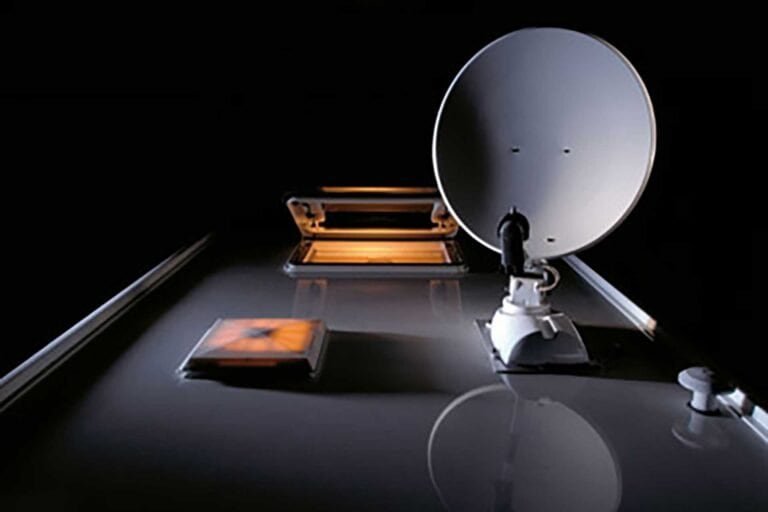
Picking a campervan satellite dish is your ticket to getting decent TV reception when you’re parked up in the middle of nowhere and the normal aerial isn’t cutting it. Your choice really boils down to two paths: a flexible, portable dish you set up on the ground, or a permanent, fixed dish bolted to your roof.
The right one for you depends entirely on how you travel, what your budget is, and how much faff you’re willing to put up with every time you park.
Choosing Your Ideal Campervan Satellite Dish
This is the first big decision, and it’s a classic vanlife trade-off: convenience versus flexibility. There’s no single right answer, just the right answer for your van and your adventures. Let’s get into the nitty-gritty of the two main setups.
Portable Ground-Mounted Systems
This is the system most people start with. It’s a standalone dish on a tripod that you lug out and set up every time you stop. It’s the go-to for weekend trips or for anyone who breaks out in a cold sweat at the thought of drilling holes in their roof.
The big win here is flexibility. If you’ve found the perfect pitch but it’s tucked under a massive oak tree blocking the southern sky, no problem. You can just run a longer cable and plant the dish in a clearing 10 metres away. They’re also usually cheaper and you can easily move the whole kit to a different van if you upgrade.
But that flexibility has its price. You have to find somewhere to store the dish, the tripod, and all the wiring inside your van, which eats into precious space. Setting it up and taking it down every time can become a real chore, especially when it’s lashing it down with rain. They’re also an easy target for strong winds or anyone who fancies nicking it while you’re out for a walk.
Fixed Roof-Mounted Systems
A fixed satellite dish is permanently installed on your van’s roof. This is the top-tier option for convenience, especially the fancy automatic ones that find the satellite for you at the push of a button. There’s zero setup, it doesn’t take up any living space, and it’s securely bolted to your vehicle.
For those considering their options, understanding the nuances of Campervan Satellite Dish Installation is essential to ensure you make the best choice for your travel needs.
For those looking to enhance their camping experience, understanding the process of Campervan Satellite Dish Installation can make a significant difference.
If you’re a full-time vanlifer or out most weekends, this is the dream. The biggest hurdles are the much higher initial cost and the fact you’re committing to a permanent, properly sealed hole in your roof. Your parking spot is also your only option; if a tree is in the way, your only choice is to move the entire van.
Portable vs Fixed Campervan Satellite Dish
To make it dead simple, here’s a head-to-head comparison. Think about what matters most to you—ease of setup, cost, or the ability to park anywhere.
| Feature | Portable Ground-Mount | Fixed Roof-Mount |
|---|---|---|
| Convenience | Low – manual setup every time | High – always ready to go |
| Flexibility | High – can be moved to avoid obstacles | Low – limited by van’s position |
| Initial Cost | £100 – £300 | £500 – £2,500+ |
| Storage | Takes up internal van space | None required |
| Installation | None – it’s portable | Permanent drilling required |
| Security | Vulnerable to theft and wind | Very secure |
| Best For | Weekend trips, budget builds, those who hate drilling holes | Full-timers, frequent travellers, convenience seekers |
Ultimately, there’s no substitute for thinking about how you actually travel. If you’re a fair-weather camper who sticks to open sites, a fixed dish is brilliant. If you love tucking yourself away in wooded spots, a portable dish will save you a lot of frustration.
A quick bit of history that’s actually useful: in February 2014, the UK’s satellite signal coverage got a massive upgrade. Before then, you often needed a huge 60cm or 75cm dish to get a reliable picture. Now, a much more compact 45cm dish is all you need for most of the UK. The Camping and Caravanning Club has a great write-up on how this changed things for tourers.
Of course, once you’ve got a signal, you need a decent screen to watch it on. To finish off your entertainment setup, check out our guide on choosing the best TV for campervans.
How to Mount and Seal a Roof Dish Without Leaks
Drilling into your campervan roof for the first time… it’s a moment that separates the casual enthusiast from the truly committed. It feels like a point of no return, but trust me, getting a professional, leak-free finish is easier than you think if you’re just methodical about it.
The long-term success of your dish installation really boils down to two things: getting the placement absolutely spot-on and creating a seal that’s completely bombproof. Nail these, and you’re set for years of trouble-free telly.
Selecting the Perfect Mounting Spot
First things first, you need to decide where this thing is going to live. This isn’t just about finding a flat bit of roof; you’ve got to think in three dimensions and consider how your van will interact with the world around it.
- Obstruction-Free Zone: Make sure the dish has a clear 360-degree view when it’s raised. Look for potential conflicts with roof vents, skylights, and especially solar panels, which could cast a shadow on the dish or vice versa.
- Aerodynamic Placement: If you can, position the dish behind existing roof furniture like a pop-top or a large skylight. This helps shield it from the worst of the wind resistance while driving, which reduces strain on the mountings and cuts down on wind noise.
- Internal Access: Before you even think about drilling, get inside the van and check what’s on the other side of your chosen spot. You need to avoid drilling into structural roof supports, hidden wiring looms, or right above a cabinet where you can’t get a spanner in to tighten the bolts.
Once you’ve found that perfect spot, mark the positions for the mounting plate and where the cable will enter using a pencil. Take a deep breath—it’s time to prep the surface.
A critical mistake I’ve seen people make is rushing the prep stage. A clean, properly keyed surface is non-negotiable for a lasting bond. Taking an extra 10 minutes here will save you hours of leak-hunting and misery down the line.
Creating a Watertight Seal
The real secret to a permanent, waterproof seal isn’t just slapping on a load of sealant and hoping for the best. It’s about creating the perfect conditions for that sealant to bond properly with your roof.
Start by giving the marked area a thorough clean with an alcohol-based cleaner. This gets rid of any road grime, wax, or dirt. Next, lightly scuff the paintwork inside your marked area with fine-grit sandpaper. This process is called ‘keying’, and it gives the sealant a rough surface to physically grip onto, creating a much stronger mechanical bond.
When it comes to the sealant itself, don’t cut corners. A top-quality, flexible adhesive sealant like Sikaflex 522 is pretty much the industry standard for a reason. It’s designed to handle the vibration and temperature swings a campervan roof endures and it’s UV-stable, so the sun won’t destroy it in a year.
Apply a generous, continuous bead of sealant inside your marked area and around each drill hole. Place the mounting plate down firmly, letting the sealant squeeze out around the edges. Bolt it down from the inside, but don’t go crazy overtightening—you want the sealant to form a flexible gasket, not be squeezed out completely.
For the cable entry point, you absolutely need a dedicated gland. To prevent water getting in where the cables come through the roof, a proper seal is crucial.
Finally, just be patient. Let the sealant fully cure according to the manufacturer’s instructions. This usually means waiting at least 24 hours before you even think about hitting the road.
Wiring Your Campervan Satellite System
Right, the dish is bolted and sealed to the roof. Now for the bit that separates a pro job from a leaky disaster: getting the cables inside. The aim here is to make the wiring look like it was always part of the van – neat, tidy, and completely weatherproof.
The main artery of your system is the coaxial cable. This is what carries the signal from the dish’s LNB (the little arm at the front) down to your receiver or telly. It’s tempting to just drill a hole and squirt a load of silicone in, but that’s asking for trouble.
Trust me, the proper way is to use a waterproof cable entry gland. It’s a cheap bit of kit that creates a compression seal around the cable, making it genuinely watertight. Drill your entry hole near the dish mount, feed the cable through, fit the gland, and tighten it up. Slap a generous bead of a good sealant like Sikaflex 522 around its base for good measure. Job done, no leaks.
Powering Your Satellite System
If you’ve gone for a simple manual dish, the coaxial cable is your only worry. But if you’ve got an automatic or semi-automatic system, it needs 12V power for its motors and brainbox. This means running another cable from your leisure battery.
Don’t just tap into the nearest wire. Run a dedicated power line and always, always install an inline fuse close to the battery. This is non-negotiable; it protects the expensive satellite electronics from any power spikes. Check the manufacturer’s specs, but a 5-amp or 7.5-amp fuse is usually all you need.
My top tip is to run the 12V power cable right alongside the coaxial one, feeding both through the same entry gland if it’s big enough. It keeps the roof penetration down to a single point, which massively reduces your chances of a leak down the line.
Once the wires are inside, it’s just a case of connecting the dots.
- Coaxial Cable: This plugs into the ‘LNB IN’ or ‘SAT IN’ port on your satellite receiver box. If your TV has a satellite tuner built-in, it might go straight into the back of that.
- 12V Power Cable: This feeds the control box for your automated dish. Get your positive (red) and negative (black) wires the right way round or you’ll be buying a new control box.
To avoid a mess of dangling wires, use small cable clips or a bit of plastic trunking to route them neatly from the ceiling down to your TV area. A bit of planning here saves a massive headache later.
If you’re new to campervan electrics, it’s worth getting your head around the basics first. Our complete guide explaining campervan electrical systems is the perfect place to start. A tidy, well-thought-out electrical system is the foundation of a reliable van.
Finding a Signal and Aiming Your Dish
Right, so you’ve got this beautiful new satellite dish perfectly installed on your campervan. Brilliant. Now for the bit that feels like a dark art but is actually pretty simple once you’ve done it a couple of times: pointing it at a tiny metal box hovering 22,000 miles away in space.
The goal is to get a completely clear, unobstructed view of the Astra 2 satellites, which hang out in a fixed spot to the south-east.
Before you even think about touching the dish, just use your eyes. Look south. Can you see anything that might get in the way? I’m talking tall trees, buildings, or even that massive high-sided motorhome that just parked next to you. An obstructed view is the number one reason people fail to get a signal. Even a few pesky branches waving in the wind can be enough to ruin your picture, so always park in the clearest spot you can find.
The Three Key Adjustments
When you’re aiming a manual dish, you’re basically juggling three settings to get them just right. It sounds a bit technical, but it’s just logic.
You need to nail:
- Elevation: This is simply the up-and-down angle of the dish. For most of the UK, you’ll be aiming for somewhere between 20-30 degrees up from flat.
- Azimuth: This is the side-to-side direction. You’re pointing the dish roughly south-east to find the Astra 2 cluster.
- Skew: This is that slight twist you can give the LNB (the little receiver arm at the front). It fine-tunes the signal polarity, and a tiny rotation here can make a massive difference to picture quality.
Honestly, the easiest way to get your bearings is with a satellite finder app on your phone. Something like Satellite Finder or SatFinder Lite uses your phone’s camera and GPS to literally show you where the satellite is in the sky. It’s a fantastic way to get a rough alignment sorted in seconds.
Once an app gets you in the ballpark, the real fine-tuning happens with your TV’s built-in signal strength meter. Slowly, and I mean slowly, sweep the dish left and right, then up and down in the tiniest of movements. Keep your eye on the signal quality bar, not just the strength. Patience is everything here; a nudge of just half a degree can be the difference between a perfect picture and that dreaded ‘No Signal’ message.
After a few trips, this whole process becomes second nature. Even with a fully manual system, you’ll soon be parking up and locking onto a signal in minutes, ready to get the kettle on before the TV guide has even loaded.
Is a Campervan Satellite Dish Your Best Option?
Let’s be honest. Before you start drilling holes in your roof for a satellite dish, you need to ask yourself if it’s genuinely the best tool for the job. For a growing number of us living the van life in the UK, the answer is a firm “no.” The romance of live TV wherever you park is strong, but the reality of modern connectivity offers far better, more versatile options.
The game-changer? Decent mobile internet. I’m not talking about tethering to your phone. I mean a proper 4G/5G router paired with a high-gain external antenna. This kind of setup can pull in a usable signal even in spots where your phone shows one lonely, flickering bar. Suddenly, your van is a proper WiFi hotspot.
This setup does more than just let you stream BBC iPlayer or Netflix on a rainy evening. It’s the difference between being connected and being isolated. It means you can work from the van, take video calls, plan your next stop, and stay in touch with family. It’s a single solution for both entertainment and the practicalities of life on the road. We’ve got a full guide on putting these systems together right here: portable WiFi for campervans.
Mobile Internet vs. Satellite TV
Think about what you actually need. A satellite dish is a one-trick pony; it gets you broadcast television. That’s it. But a dedicated internet setup gives you everything. Are you just trying to catch the evening news, or do you also need to fire off some emails, look up a route on Google Maps, and then crash out with a film?
Let’s talk brass tacks. For most of us travelling in the UK, a solid 4G setup is the smarter choice. A 2021 analysis confirmed what most of us already knew: we rarely venture so far off-grid that we lose 4G service entirely. The cost difference is stark. A complete 4G WiFi system will set you back around £350, with an unlimited data SIM costing about £20 a month. That’s a fraction of what you’d spend on satellite internet. You can dig into the details on this at Maxview.co.uk.
Now, if you’re planning to disappear into the most remote corners of the Scottish Highlands or deep into Europe where even a boosted signal gives up the ghost, that’s when satellite internet comes into play. But it’s a whole different beast.
The Rise of Satellite Internet: Starlink
For the digital nomads who genuinely depend on a bulletproof connection to make a living, Starlink has been a revelation. It offers high-speed internet almost anywhere on the planet with a clear view of the sky. Suddenly, taking a video conference from a deserted glen in Scotland isn’t just possible, it’s reliable.
But—and it’s a big but—the cost is serious. You’re looking at several hundred pounds for the hardware upfront, and the monthly subscription is significantly more than a 4G data plan. It’s also thirsty for power, which is a major headache for anyone running an off-grid electrical system.
- Starlink Pros: Unbeatable coverage in the back of beyond. Genuinely fast internet for demanding work.
- Starlink Cons: Eye-watering initial and monthly costs. A serious drain on your leisure battery. The hardware is bulky and a pain to store.
For most vanlifers, Starlink is total overkill. A well-thought-out 4G/5G system provides all the bandwidth you need for streaming and daily browsing at a much lower cost and with a far gentler power draw.
No matter which satellite system you choose—be it for old-school TV or cutting-edge internet—you’ll need to get good at aiming it.
This diagram shows the three crucial adjustments—elevation, azimuth, and skew—you have to nail to lock onto a signal. Getting this process down is fundamental, whether you’re trying to watch the news or join a Zoom call. At the end of the day, the right choice comes down to a hard look at your real-world needs, your budget, and how you actually travel.
Common Questions About Campervan Satellite Dishes
Even after you’ve picked a system and sketched out the installation, there are always a few nagging questions that pop into your head. It happens with every part of a van build.
Let’s run through some of the most common queries I hear from fellow vanlifers. Think of this as the stuff I wish someone had told me straight when I was first staring at satellite options, completely bewildered.
How Much Power Does a Satellite Dish Actually Use?
This is a massive deal for anyone living off-grid, and rightly so. Your power budget is everything. The answer depends entirely on what kind of dish you’ve got.
A simple, manual dish uses precisely zero power from your leisure battery. Nothing. All the work is done by your satellite receiver box or the TV’s built-in tuner, which usually sips a very small amount of 12V power.
An automated satellite dish, on the other hand, is a different beast entirely. When those motors are spinning around trying to find a signal, they can pull a chunky 4 to 6 amps. Once it’s locked on, the power draw drops to almost nothing, but that initial search can put a real dent in your battery, especially on a grey day with no solar coming in.
If you’ve got a smaller battery bank – say, around 100Ah – that initial power draw is something you really need to factor into your daily budget. Firing up an automatic dish a few times during a bleak British winter could drain your juice much faster than you’d expect.
Will My Satellite Dish Work in Bad Weather?
Mostly, yes. Modern satellite systems are surprisingly tough and will keep a solid picture through light-to-moderate rain and cloud. You might notice the signal quality percentage on your TV dip a little, but it’s rarely enough to actually break up the picture.
The exception is properly torrential, biblical-style rain or very heavy, wet snow. This can sometimes cause the signal to drop out completely, a thing called ‘rain fade’. It happens because the sheer amount of water in the air literally gets in the way of the microwave signal from space. The good news is these blackouts are usually short-lived. As soon as the worst of the storm passes, your picture will pop right back on.
Can I Use My Sky Q Box in My Campervan?
Technically, you can, but honestly, it’s usually more hassle than it’s worth. The standard LNB (the little receiver bit on the dish’s arm) on a campervan satellite isn’t compatible with the ‘wideband’ signal a Sky Q box needs to function. To get it working, you’d have to source and fit a special wideband LNB onto your dish.
Even then, Sky Q boxes are designed for a house plugged into the mains. They can be pretty power-hungry and aren’t really built for the rough-and-tumble of a 12V off-grid system. For most of us, a dedicated 12V satellite receiver or a TV with a built-in Freesat tuner is a much simpler, more robust, and more power-efficient way to get all the free-to-air UK channels.
At The Feral Way, we provide practical, road-tested advice for every stage of your van conversion journey. Explore our other guides and build your dream van with confidence. Find out more at https://www.theferalway.com.